


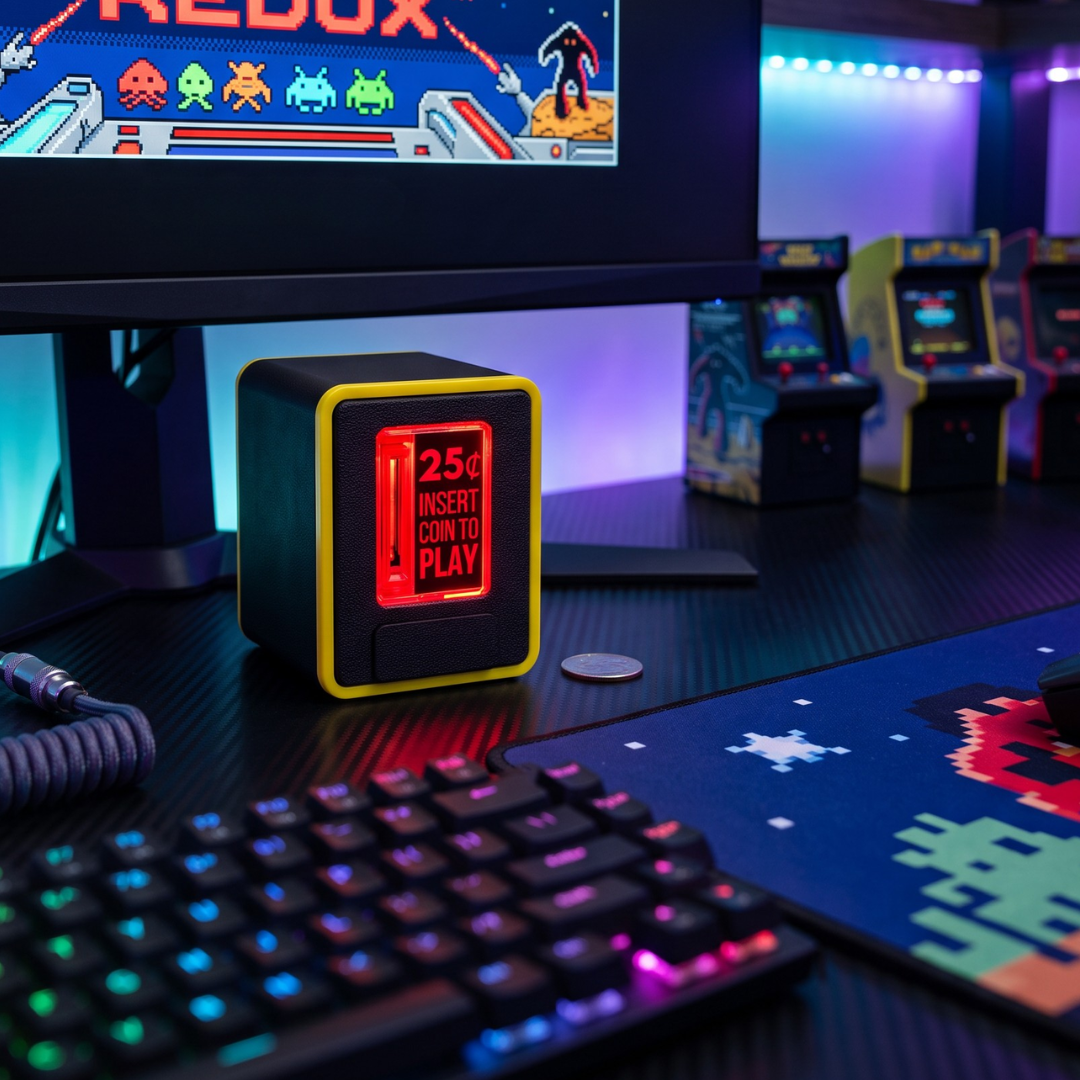
Press Insert Coin to Play and Relive the Magic of the Arcade
Step back into the golden age of gaming with the TinyBrights™ Insert Coin Cube Gen 2 by Chronic Concepts®. A miniature, fully interactive tribute to the classic arcade coin slot. Press the real Insert Coin To Play button and watch it light up with a nostalgic red glow as arcade inspired sounds bring every press to life.
Drop in the included token and hear it trigger a sound as it travels through the cube and exits the front chute, bringing the satisfying nostalgia of the arcade anywhere you choose to display it.
But Gen 2 is more than a retro display piece, it’s built to interact with your setup. Connect to the web app to customize your experience, or integrate the cube with a computer, emulator, arcade cabinet, and more. Whether it’s on your desk, bookshelf, game room shelf, or part of your gaming setup, the Insert Coin Cube Gen 2 brings a new level of light, sound, interaction, and nostalgia to any space.

Product Features
Press to Play
The premium injection-molded insert coin button really pushes in, lighting up with a nostalgic red glow and playing sounds inspired by classic arcade machines with every press.
Interactive Coin Slot
Drop in the included token or a U.S. quarter and it will trigger an arcade sound as the coin travels through the cube and exits the front chute for a fully interactive arcade-inspired experience. Coin slot sound effect can be customized.
Pre-Loaded Arcade Sounds
Includes 15 pre-loaded arcade sound effects.
Add Your Own Sounds
Keep the original sounds, add your own, or create a custom mix of both with storage for up to 20 total sounds (approximately 40 seconds of audio total, depending on audio quality).
Web-Based Customization (Downloadable for Offline Use Forever)
Personalize your device with ease using our browser-based configuration app. Manage your sound library, customize keyboard emulation, enable additional features, and fine-tune your setup all without installing software or downloading an app. Simply connect via USB cable to any PC, Mac, or Linux device and open our configuration website. Our web app is a static web page, not cloud-based, and can be downloaded for offline use forever. No internet or website dependency. You always have control of your Cube!
External Button Emulation
Easily wire the cube directly into an external USB encoder, arcade cabinet, PC power button, or other interface. Inserting the coin or pressing the Insert Coin button triggers the output. (Wired Button Connection Kit sold separately)
USB Keyboard Emulation
Connect the cube to your computer or emulator, each button press or coin insertion can send a standard keyboard key input of your choice. Use it for putting credits into your emulator, game start, push to talk, or anything else you can imagine. Cube functions as a USB-HID keyboard device and works with Linux, Windows, Mac, Retropie, & MAME. Compatible with most systems and software that support USB keyboards. Easily configurable via our web app.
Piggy Bank Mode
Insert the included plug to turn the cube into a tiny piggy bank that holds up to 5 arcade tokens or U.S. quarters. Optional Piggy Bank Mode temporarily powers the cube on for easy coin insertion before automatically returning to sleep mode after 10s of inactivity.
Adjustable Volume
Fine-tune the sound for your desk, office, game room, or streaming setup with 5 volume levels, including mute.
Adjustable Brightness
Easily customize the light from soft ambient glow to full arcade brightness with 5 lighting levels, including light-off mode.
Battery or USB Power Options
Includes a USB-C charging cable and runs on either rechargeable battery power or USB-C for flexible use anywhere. Enjoy up to 24 hours of battery life on low brightness, 12 hours on medium, or 5 hours on high, with a 2–3 hour recharge time, or keep it connected to USB-C for continuous use.
Optional Auto Shutdown
Automatically powers down after 4 hours of inactivity to preserve battery life. Auto-shutdown can also be disabled.
Multiple Color Choices
Available in retro-inspired color combinations including Black, Black w/ Red Trim, Black w/ Neon Green Trim, and Black w/ Yellow Trim.
Designed and Built in Colorado
Our products are designed, assembled, and hand-finished in our Colorado studio where new ideas are always in motion.
More Than an Arcade Light
-

Credits Welcome.
Feed your Tiny Piggy Bank one credit at a time. Compatible with the included arcade token and U.S. quarters. Other coins not recommended.
-

Built to Be Pressed.
Experience the satisfying feel of a real arcade button with a fully pushable INSERT COIN TO PLAY button and a working coin slot with sounds.
-

One Button. Endless Uses.
Connect to compatible PCs, arcade cabinets, and custom projects. Trigger keyboard inputs or external buttons with every press or coin insertion.
-

Your Cube. Your Way.
Upload sounds, adjust settings, and personalize your cube using our desktop web app. No software or driver installation required.


What's Included
Every Insert Coin Cube comes with everything needed to start playing right away, including:
- Insert Coin Cube Gen 2
- Arcade token
- USB-A to USB-C charging cable
- Piggy Bank Plug
Arcade Mounting Kit, Wired Button Connection Kit, and accessories are sold separately.
Built Different
At Chronic Concepts, we believe the details matter. Every TinyBrights Insert Coin Cube is designed, manufactured, hand-finished, assembled, and individually tested in Colorado by our small team. From precision 3D printed components to our premium injection molded acrylic INSERT COIN TO PLAY button, every detail is thoughtfully engineered to create an authentic arcade experience you'll enjoy for years to come.


$5.00
Token Vault + 10 Tokens
The perfect companion add-on for your Insert Coin Cube. Designed to keep your arcade tokens organized, accessible, and ready for the next “Insert Coin” moment.
This compact storage container comes pre-loaded with 10 arcade-style tokens, so you’re always stocked and ready to play. Whether you’re displaying your cube or actively using it, the Token Vault keeps everything clean, contained, and on-theme.

$10.00
Coin Trays
Expand your Insert Coin Cube setup with our new Coin Trays! Designed to externally collect and hold your coins, these accessories offer a convenient way to use your Cube without the limited storage capacity of the built-in coin compartment.
Compatible with Gen 1 and Gen 2 Cubes, with multiple designs and colors being released throughout the year.

$19.99+
Arcade Cabinet Mounting Kit
Integrate your Insert Coin Cube Gen 2 directly into your arcade cabinet with our custom mounting kit! Designed to securely hold your Cube in place, this kit allows you to mount it directly into your arcade cabinet for a clean, built-in look.
Compatible with a wide variety of arcade cabinets, including popular brands like Arcade1Up and AtGames Legends, as well as custom-built setups. Bring the classic INSERT COIN TO PLAY experience to your own arcade setup.

$10.99
Wired Button Connection Kit
Our built in external button emulation feature allows you to easily integrate your Insert Coin Cube Gen 2 into an arcade cabinet, external USB encoder, PC power button, or other compatible button interface using our Wired Button Connection Kit.
Inserting a coin or pressing the INSERT COIN TO PLAY button triggers the output, allowing your Cube to function as a physical button replacement.
Compatible with a wide variety of modern arcade button interfaces and other low-voltage, low-power applications.
Product Resources
FAQ's
Do you ship internationally?
Our website ships within the United States. We also ship to Canada, Europe, Japan, Australia, New Zealand, and Mexico through our Etsy shop. Purchase the Insert Coin Cube on Etsy.
Can I use the Insert Coin Cube with my arcade cabinet, emulator, PC, or custom project?
Yes. The Gen 2 Insert Coin Cube was designed to integrate with a wide variety of computers, arcade cabinets (including but not limited to Arcade1Up, AtLegends, etc.) emulators, and DIY projects using its built-in USB Keyboard Emulation and External Button Emulation features. Any external wiring, modifications, or integrations must be performed in accordance with the user manual and remain within the product's published electrical and technical specifications. Damage resulting from improper wiring, unsupported modifications, or use outside of the documented specifications is not covered under warranty.
Do I need to install software or download an app?
No. Simply connect the cube to any Windows, Mac, or Linux computer using the included USB cable and open our web app in your browser. No downloads or drivers required.
Will the Insert Coin Cube configuration website still be available in years to come?
The configuration web app is a static webpage, not cloud-based. You can download it once, if preferred, and use it offline forever. There’s no internet connection or ongoing access to our website required. You’ll always have control of your Cube.
Can I upload my own sounds?
Yes. Easily upload your own sounds using our web app.
Does the cube work with real quarters?
Yes. The cube works with both the included arcade token and standard U.S. quarters.
Can I use it as a piggy bank?
Yes! Gen 2 introduces Tiny Piggy Bank Mode. Insert the included plug and the cube stores up to five arcade tokens or U.S. quarters while automatically waking when a coin is inserted and shutting off a few seconds later (if feature is enabled).
What are the dimensions?
Fits in the palm of your hand!
Height: 2.75 inches
Width: 2.2 inches
Depth: 2.5 inches
The cube has a slight taper from front to back, so the front is slightly wider than the back.
Important Product Information
The Insert Coin Cube Gen 2 is intended for indoor use only. Recommended for ages 14+. Please review the User Manual for complete care, safety, setup, and usage instructions.
⚠️ This product is designed to support compatible external integrations, including computers, emulators, arcade cabinets, and other supported interfaces. We are not responsible for damage caused by improper wiring, improper installation, or usage outside of the documented specifications.
This product is a sealed electronic collectible and is not intended to be opened, disassembled, internally modified, rewired, or internally altered in any way. Unauthorized opening, disassembly, or internal modification will void the warranty and may create a safety risk.
TinyBrights™ is an exclusive brand collection owned by Chronic Concepts®. Unauthorized use or reproduction of our designs, photography, descriptions, or trademarks is strictly prohibited.