


Turn your Insert Coin Cube Gen 2 into a built-in arcade coin mechanism in as little as 20 minutes!
Our custom-designed Mounting Kit makes it easy to install your Cube directly into an Arcade1Up, custom arcade cabinet, or other suitable panel with just one drilled hole. Enjoy an illuminated INSERT COIN button, a working coin slot, and customizable arcade sounds without complicated cabinet modifications or custom brackets.
Bring the Arcade Experience to Life! Drop in a real quarter or arcade token, hear nostalgic sound effects, and bring authentic coin-operated functionality to your arcade setup. Pair your mounted Cube with our Wired Button Connection Kit (sold separately) to trigger in-game credits through a compatible arcade controller, or use the Cube's built-in USB Keyboard Emulation feature with computer-based arcade systems.
Easy Installation - Just One Hole to Cut! Choose your mounting location, drill a single properly sized hole, and secure your Cube with the included mounting hardware. With basic tools, many installations can be completed in as little as 20 minutes. Follow our step-by-step installation guide for a complete walkthrough.
WHAT'S INCLUDED:
- Purpose Built Through Wall Bracket: Designed to securely install your Insert Coin Cube Gen 2 through a cabinet wall or panel.
- Cube Retainer Bracket: Holds the Insert Coin Cube inside the installed bracket.
- 2X Bracket Clamps: These secure the brackets against the back of the mounting panel. Their orientation can be changed to accommodate different panel thicknesses.
- 6X Screws: To secure the mounting hardware.
- Hex Wrench
- (Optional) 3.5-inch (89 mm) Hole Saw: Highly recommended for creating the mounting opening.
- Price listed is for: 1 Arcade Cabinet Mounting Kit. The Insert Coin Cube Gen 2 and Wired Button Connection Kit are sold separately. Hole Saw is an optional variation.
RECOMMENDED ADD ON'S:
- 3.5" (89mm) Hole Saw (OPTIONAL – HIGHLY RECOMMENDED!): Perfectly sized for drilling the mounting hole needed to install your Cube. Available as an optional add-on when selecting your Mounting Kit variation.
- Wired Button Connection Kit (OPTIONAL – SOLD SEPARATELY): Connect your Cube directly to an arcade controller, PC power button, or other compatible button interface. Alternatively, the Cube's built-in USB Keyboard Emulation can be used with computer-based arcade systems without additional wiring. Learn more about our Wired Button Connection Kit.
INSTALLATION & COMPATIBILITY:
- Compatible With: TinyBrights™ Insert Coin Cube Gen 2 (Model #S1025) and optional Wired Button Connection Kit
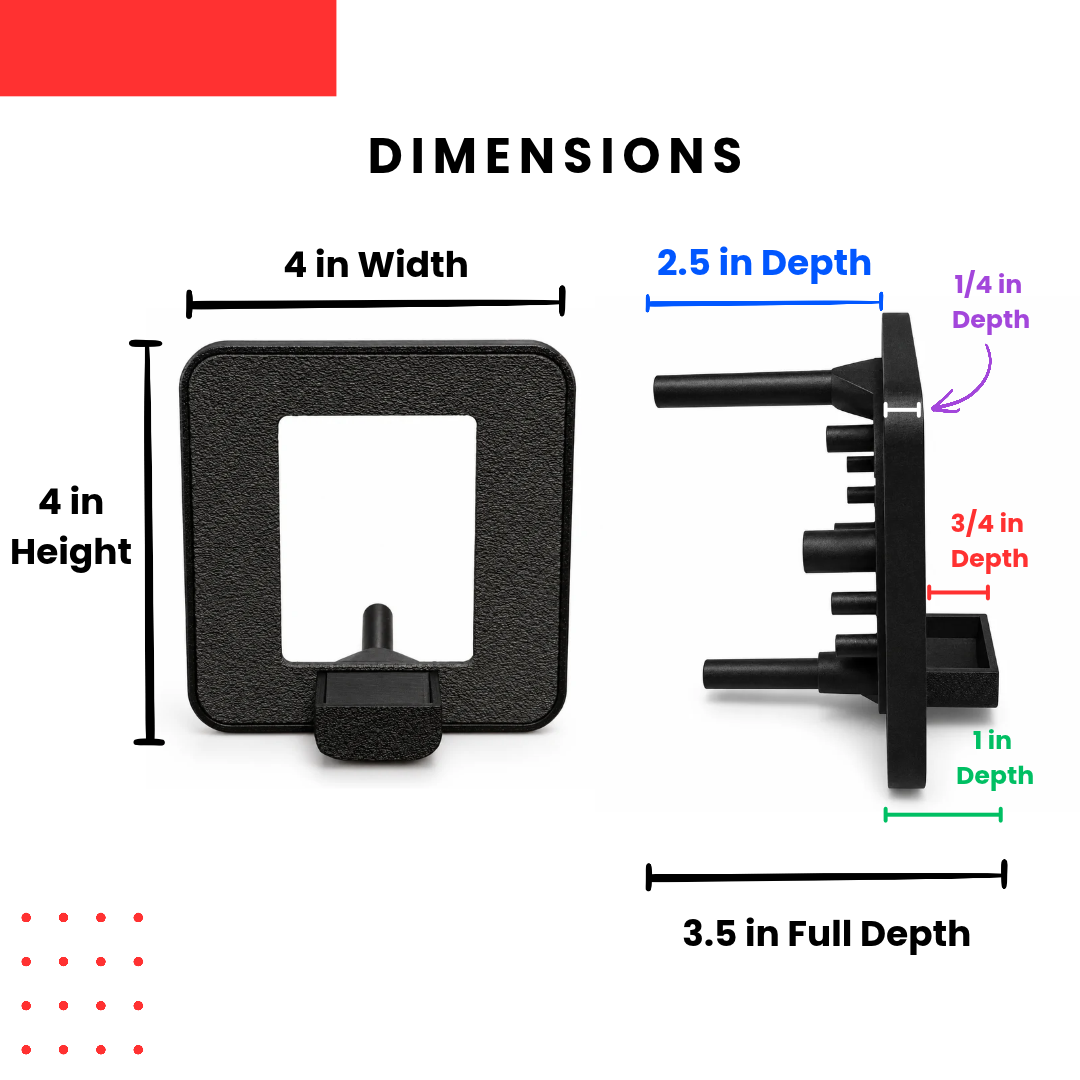
- Mounting Style: Through-panel installation in as little as 20 minutes using a single drilled or cut opening. Supports all common panel thicknesses from 3/16" (4.5mm) to 3/4" (19mm).
- Dimensions: Front face is 4"x4" (100mmx100mm) and install depth with 3/16" (5mm) panel is only 2.25" (59mm).
- Installation: Watch our walkthrough video (coming soon)! Requires access to the back of the mounting panel and basic tools, including a drill, screwdriver, and 3.5in hole saw (can be purchased with kit).
- Coin Operation: Supports the Cube's existing working coin slot, illuminated button, and customizable sound effects. Coins drop into a convenient tray for quick re-use.
- Power: The Cube operates on its built-in rechargeable battery or USB-C power. Continuous USB power is recommended for permanent installations.
-
Arcade Integration: Compatible systems can use the Cube's USB Keyboard Emulation or optional Wired Button Output feature to register button presses and coin insertions.
Need help getting started? Check out our step-by-step installation guide for mounting instructions, wiring examples, and customization tips.
Important Product Information
Insert Coin Cube Gen 2 and Wired Button Connection Kit sold separately. Tools are not included. Drilling or modifying your arcade cabinet may void its manufacturer's warranty. The mounting kit provides physical installation only; electronic integration requires a separate compatible connection. Always verify panel dimensions, clearances, and electrical compatibility before installation.
TinyBrights™ is an exclusive brand collection owned by Chronic Concepts®. Unauthorized use or reproduction of our designs, photography, descriptions, or trademarks is strictly prohibited.